
It minds thy labour.
Thou gettest the bread.

A Mac menu-bar app that turns your git commits and coding sessions into a timesheet, then a finished invoice by month's end.

Free for 14 days · No card · Signed & notarized by Apple

Built by a designer from
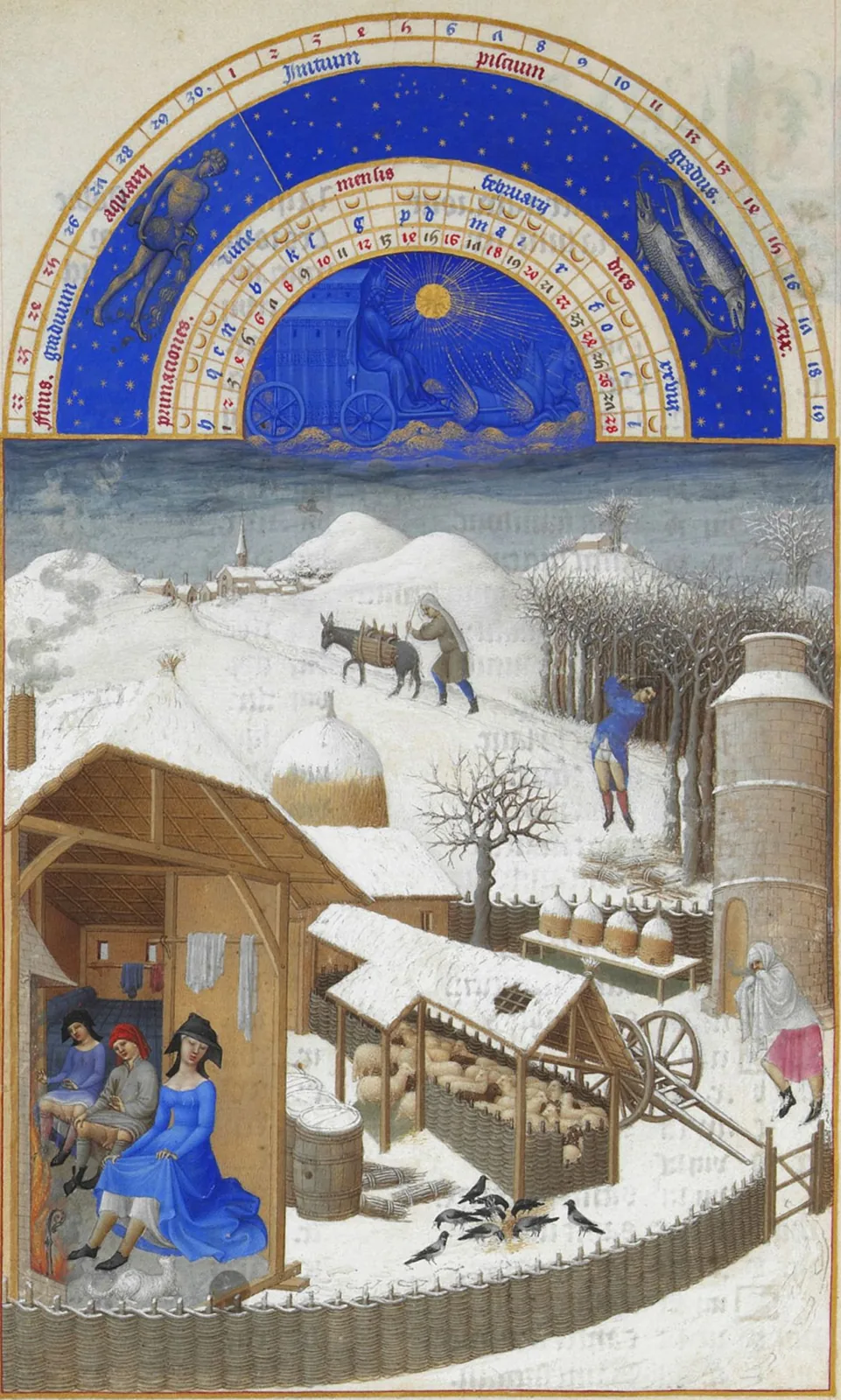
Get Thy Bread: a medieval harvest and bakery illustration, with peasants harvesting wheat and a baker drawing loaves from an oven
Invoice INV-006
Homepage & pricing page$1,805
Case study layout$1,045
Component library$1,425
Review & handoff$1,092
Total$5,367

No clocking in. No remembering.

The two reasons invoicing is miserable, and what replaces them.

"Wait… what did I even do three Tuesdays ago?"

It already wrote it down. The day it happened, from the work itself, not your memory.

A lost afternoon piecing the month together

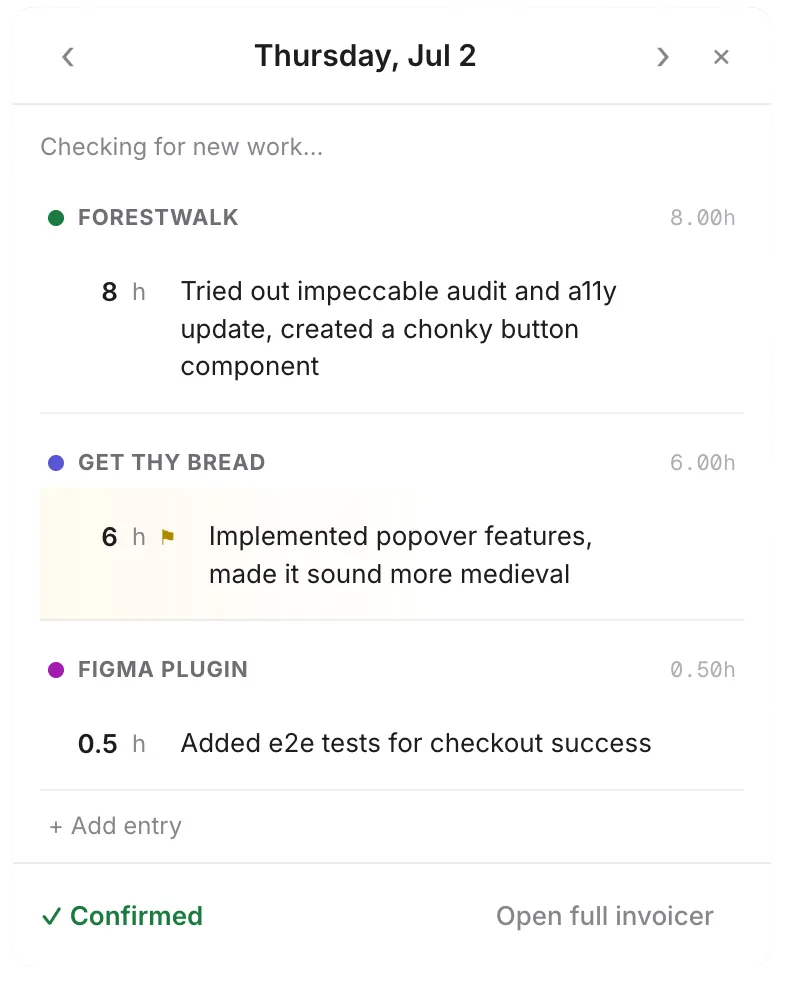
Thirty seconds a day instead. By the 1st, the timesheet's already built.

Clock in, clock out, remember to, forget to

No timers. It infers the hours from what you actually shipped, and flags anything it's unsure about.

An invoice that looks like a 2013 spreadsheet

Out comes something you'd actually be proud to send. (You're a designer. It shows.)

Hours returned to thee.

The end-of-month scramble is the quiet tax you pay for working for yourself, and it adds up to a real evening every time. This hands most of it back.

~3 hrs

spent piecing the month together and wrestling invoice software, gone every single month.

30 sec

a day to glance at the nudge and confirm what you did, which is the whole job now.

0

timers to start, stop, or sheepishly remember you forgot to start at all.

It reads the work you already do.

No new habits. It quietly notices the trails you leave and turns them into billable lines.

GitHub & git

Commits and merged PRs become the line you were too deep in code to write.

Google Calendar

Meetings you actually attended, billed to the quarter-hour. Solo blocks ignored.

Claude sessions

What you explored and built with Claude, collapsed from a hundred micro-steps into one honest summary.

Or just paste

No signal for it? Drop in notes, a Toggl export, scribbles. Or tell it in chat. It listens.

A plain oath

It works for you, not on you.

Most tools like this can be aimed at a worker by whoever is paying. This one was built so it never can be.

It stays on your Mac

Every signal it reads is handled on your own machine and never uploaded, so there is nothing to breach but your own laptop.

No boss's-eye view

There is no team dashboard and no manager login, and there never will be. It answers to you and to no one above you.

Your client only sees the invoice

They never touch the tool or see your day. The single thing that ever leaves is the finished invoice you choose to send.

Set it once. Then mostly forget it.

I.

Connect

Point it at each client's repos and connect your calendar. One-time setup. It learns which work belongs to which client, and what's just yours.

II.

Get nudged

Once a day, the menu-bar popover shows what it saw. Confirm in a tap, or add what it missed. Skip a day and it waits for you.

III.

Refine

"Merge those two days." "Bill design at $150." "Drop the sick day." Chat with it like a person. It listens.

IV.

Send

Month ends, the invoice is built. Tweak, export a clean PDF, send. No payment links you don't want.

Not built for accountants.

The timers want you to babysit them and the accounting suites want you to become a bookkeeper. This was built to want neither of those things from you.

Time trackersToggl, Harvest Accounting & paymentsFreshBooks, QuickBooks, Stripe Get Thy Bread
Tracking your hours You start and stop a timer You type them in later It reads the work you already did
Remembering to log it On you On you One nudge a day, then a tap
Setup Projects, tags, and rates Full accounting onboarding Point it at your repos and calendar, once
The invoice it makes A bare template Accountant-grade and charmless Designed, one you'd actually send
Fees on what you earn Only if you collect through them 2.9% + 30¢ per payment 0%. It never touches your money.
Made for Teams and agencies Businesses with a bookkeeper A freelancer with a client or two

Or dump a month in a box.

The capture is the magic, but the old way still works. Paste whatever you've got and it builds the same clean timesheet.

paste.txt
14 lines
mar 3  - kickoff w/ jamie, like 1.5h?
mar 5  - homepage mocks, all day
mar 6  - groceries homepage cont. ~6h
mar 9  - pricing page, 4h
         + revisions (2h)
mar 11 - case study layout, half day
mar 12 - case study, finished it
mar 13 - [don't bill, sick]
mar 17 - design review, 2h
mar 18 - component library
mar 19 - component library (full day)
mar 24 - handoff + walkthrough 3h
mar 27 - final revisions, ~5h

rate: 95/hr
Timesheet · March 2026
$95/hr
DateWorkHrs
Tue Mar 3Kickoff call, Jamie1.5
Thu Mar 5Homepage mocks7.0
Fri Mar 6Homepage mocks6.0
Mon Mar 9Pricing page + revisions6.0
Wed Mar 11Case study layout4.0
Thu Mar 12Case study finalize7.0
Tue Mar 17Design review2.0
Wed Mar 18Component library7.5
Thu Mar 19Component library7.5
Tue Mar 24Handoff & walkthrough3.0
Fri Mar 27Final revisions5.0
Total · 11 days56.5

An invoice that doesn't look like the dark ages.

No clip-art logo, no "Powered by", and no fee skimmed off the top. Just an invoice you'd actually send, paid however you already get paid.

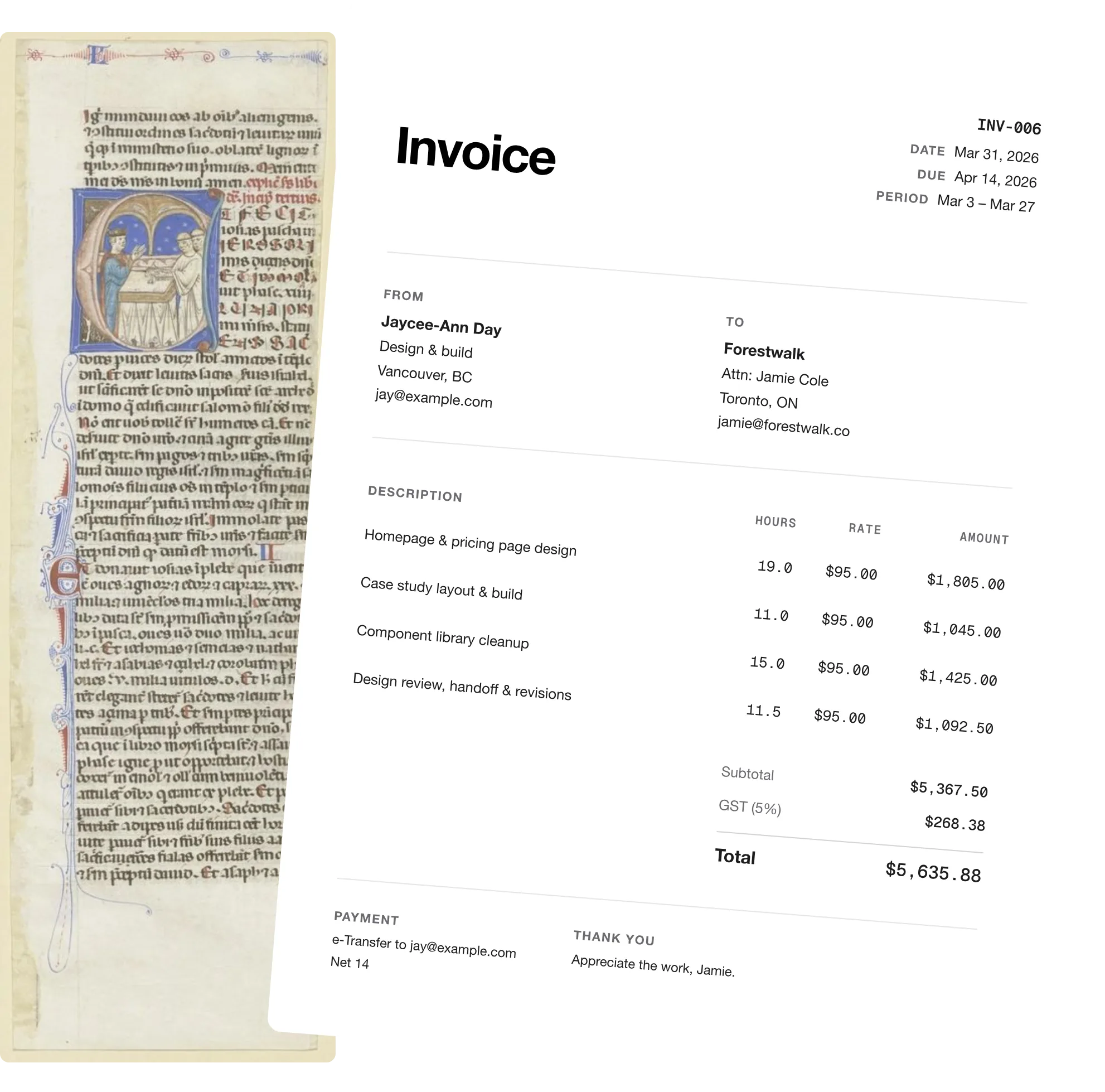
Invoice

INV-006
DateMar 31, 2026
DueApr 14, 2026
PeriodMar 3 – Mar 27

From
Jaycee-Ann Day
Design & build
Vancouver, BC
To
Forestwalk
Attn: Jamie Cole
Toronto, ON

Description Hours Rate Amount
Homepage & pricing page design19.0$95.00$1,805.00
Case study layout & build11.0$95.00$1,045.00
Component library cleanup15.0$95.00$1,425.00
Design review, handoff & revisions11.5$95.00$1,092.50
Subtotal$5,367.50
GST (5%)$268.38
Total$5,635.88

I built it for myself.

I freelance for one main client. Once a month I'd scroll through commits, calendar entries, and Slack threads trying to remember what I actually did, and I'd always lose a few days to "I know I worked, I just can't prove it." Then I'd open an invoicing tool built for an accounting team of forty and fight it for an hour.

The invoice it made was ugly. I'm a designer. I sent it anyway.

So I built the thing I actually wanted, which quietly notices the work as it happens, asks me one small question at the end of each day, and has the whole invoice waiting by the time the month rolls over. Now the end of the month is a thirty-second glance instead of a lost evening of detective work, and the thing that comes out the other side is finally an invoice I'm happy to put my name on.

Jaycee

One fair price. No tithes.

Free for 14 days with no credit card. Then one flat price for everything: automatic capture, the daily nudge, chat editing, designed invoices, and as many clients as you have. Never a fee on the money you earn.

$12USD / month
$10USD / month

Billed monthly. Cancel anytime, right from the app.

$120 billed yearly, two months free. Cancel anytime.

The AI drafting is included, no API key or setup of your own. Your work data stays on your Mac either way. Begin thy free trial.

Things people ask.

How does it track my hours without a timer?
It reads the trail you already leave behind: your git commits, the meetings on your calendar, and the sessions you run with Claude. At the end of the day it shows you what it saw and you confirm or adjust it, so there's nothing to start and nothing to stop.
What if I forget to check the daily nudge?
Nothing breaks, and nothing nags you. The day quietly waits, and the next time you open the app it's still there to confirm, so a missed Tuesday doesn't vanish, it just queues up and waits until you get to it.
How does it know what's actually billable?
You point it at the client's repos and calendar once and it learns what counts as their work and what's your own side project. It also flags anything it's unsure about rather than quietly inventing hours, so you stay the one who decides what makes it onto the invoice.
Do I have to use Claude or GitHub for it to work?
Not at all. Those just make the capture richer and more automatic, but if you'd rather paste in your own notes or type the month out by hand, it builds the same clean timesheet from whatever you give it.
Where does my data live?
On your Mac. It reads your work locally rather than shipping your whole working life off to someone else's server, which is honestly the entire point of building it this way.
Can my client or boss see any of this?
No, and it's built so it never can. Get Thy Bread runs on your Mac and works only for you, with no team dashboard, no manager view, and no account your client ever logs into. Nothing about your day is uploaded anywhere they could reach, and the only thing that ever leaves your machine is the finished invoice you choose to send. It works for you, not on you.
Does it take a cut of my invoices?
Never. Get Thy Bread doesn't process payments at all, so there's no per-invoice cut and no processing fees nibbling away at what you earn. It writes the invoice and you get paid exactly the way you already do, with every cent of it staying yours.
How is this different from FreshBooks or Harvest?
Those are built for teams, bookkeepers, and people who genuinely enjoy configuring projects and tags. This is built for one freelancer with a client or two who simply wants the month to add itself up and hand back an invoice worth sending.
How do freelancers track billable hours automatically?
Instead of starting and stopping a timer, you let the work track itself: Get Thy Bread reads the git commits, calendar meetings, and Claude sessions you already produce, then turns them into hours you confirm at the end of the day. Automatic time tracking for freelancers means there's nothing to remember and nothing to forget.
Is there a free time tracker and invoice app for Mac freelancers?
Get Thy Bread is a Mac menu-bar app with a free trial that both tracks your freelance hours automatically and builds the invoice from them, so you don't need a separate time tracker and invoicing tool. It's made for solo freelancers on macOS, not teams or agencies.
What's the best invoicing app that doesn't take a cut of your money?
Get Thy Bread never processes payments, so it takes no per-invoice cut and charges no payment-processing fees. It writes the invoice and you get paid the way you already do, keeping every cent, which most invoicing apps that handle payments can't say.
How much does Get Thy Bread cost?
It's free for 14 days with no credit card required. After that it's $12 USD a month, or $120 a year which works out to two months free. One price includes everything: the automatic capture, the AI drafting, designed invoices, and unlimited clients, with no per-invoice fees ever.
Can I bill more than one client?
Yes. Each client gets its own project with its own repos, calendar matching, rate, and invoices, and the daily nudge sorts new work into the right client automatically. Your invoice numbers stay in one tidy sequence across all of them.
Can I reshape the timesheet before invoicing?
Yes, in plain English. Tell the chat things like "combine everything into Mondays and Thursdays" or "bill design work at $150" and it reshapes the sheet while keeping the record of what actually happened. Days you've confirmed are frozen, so totals never quietly drift.
Does Get Thy Bread run on Windows or Intel Macs?
Not yet. Get Thy Bread is a native Mac app for Apple Silicon (M1 and later) on macOS 12 or newer. There's no Windows, Intel, or mobile version, and no web app; the local-first design is what lets it read your work without uploading it anywhere.

By order of the scribes' guild

Get thy bread.

The doors are open. Fourteen days free, no card and no catch, and thy Mac shall be drafting thy timesheet by supper.

Download for Mac Thy free trial begins in the app

Returning? Sign in to manage thy account.

And it's sent.

Finis · Once a month · No fuss